Find Any Video or Audio File as You Type
Get lifetime access to SurSort Media Manager for Mac, an app that brings all your videos and audio files into one searchable, offline library and locks your private media behind a password. Search by name, file type or tag as you type, preview clips with a hover, and stop digging through folders to find the file you need.
SurSort runs entirely on your Mac, with no cloud uploads, no account and no sign-up. It's a Universal app for Intel and Apple Silicon Macs running macOS 12.0 or later. It reads embedded metadata like artist, date and device to tag your files automatically, and free lifetime updates install automatically.
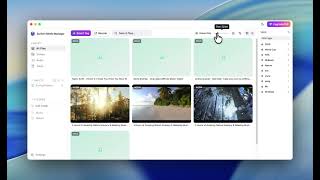
Finder keeps your media in folders, so finding one clip often means clicking through directories and opening files to check them. SurSort shows thumbnail previews across your whole library, plays any video when you hover over it, and lets you open, rename, retag, hide or trash files from a right-click menu without leaving the app.
The Mac version also includes a password-protected Vault, so private videos and audio files stay hidden until you enter your password. Everything happens locally on your Mac, with no cloud involved.
Find the Right File Without Opening a Folder
-
Real-Time Search: Results appear as you type, so you can find a file by name, format or tag even in a large library.
-
Smart Sorting: Sort your library by size, name, date or file type to see your media in the order you need.
-
Thumbnail Previews: Your whole library shows visual thumbnails, so you know what each file is before you touch it.
-
Hover-to-Play Preview: Point at any video and it plays instantly. You don't need a separate player or to open files one by one.
Organize Your Library Your Way
-
Unified Media Library: Videos, music, podcasts, voice memos and recordings all live in one place you can browse and search.
-
Automatic Tagging: SurSort reads embedded metadata like artist, date and device and tags your files for you.
-
Custom Tags: Add your own tags to group files by project, client, trip or any category that makes sense to you.
-
Right-Click File Management: Open, show in folder, edit tags, view file info, hide, rename or move files to Trash without leaving the app.
Lock Down and Protect Your Private Media
-
Password-Protected Vault: Lock sensitive videos and audio files so they're hidden and open only with your password.
-
100% Offline Operation: SurSort runs entirely on your Mac, and your files are never uploaded to the cloud.
-
No Accounts or Tracking: Start organizing right away, with no sign-up, no data collection and no login to manage.
-
Hide & Show Hidden Only: Hide files from your library view without deleting or moving them, then switch on Show Hidden Only to restore them.